
🚀 Why WhatsApp Formatting Matters in Business
-
Messages are read within minutes—but ignored in seconds
-
Well-formatted messages improve readability
-
Professional formatting builds credibility
-
Clear messages drive better responses and conversions
✍️ WhatsApp Formatting Basics You Should Master
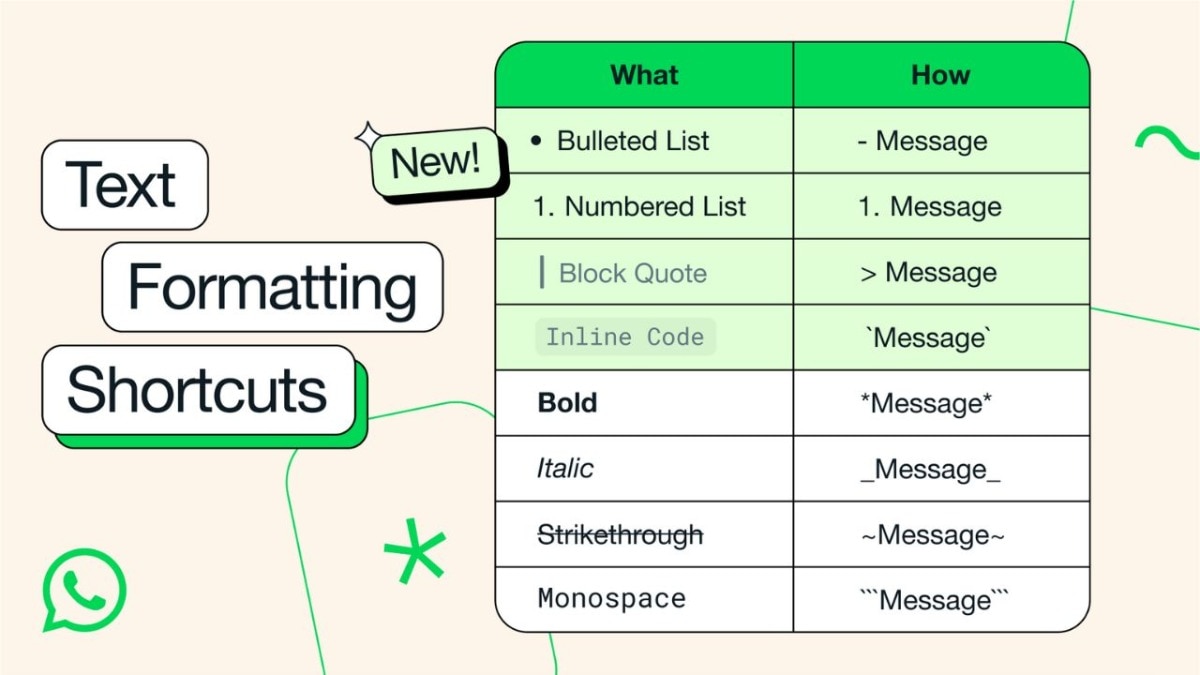
WhatsApp allows basic text formatting using simple symbols—no extra apps needed.
1️⃣ Bold Text – Grab Attention
How to use:
Example:
Best used for:
-
Headlines
-
Offers
-
Important announcements
2️⃣ Italic Text – Add Subtle Emphasis
How to use:
Example:
Best used for:
-
Notes
-
Soft emphasis
-
Supporting information
3️⃣ Strikethrough – Show Discounts Clearly
How to use:
Example:
Best used for:
-
Offers & pricing
-
Corrections
-
Before-and-after comparisons
4️⃣ Bold + Italic – Highlight Urgency
How to use:
Example:
Best used for:
-
Urgent actions
-
High-priority information
5️⃣ Monospace – For Clarity & Instructions
How to use:
Example:
Best used for:
-
Dates & timings
-
Course codes
-
Technical instructions
6️⃣ > Block Quote – Emphasize or Reply Smartly
How to use:
Example:
Best used for:
-
Testimonials
-
Trainer instructions
-
Important reminders
❌ Poor vs ✅ Professional WhatsApp Message
❌ Unstructured Message
hi tomorrow training whatsapp and ai come join link later
✅ Structured & Professional Message
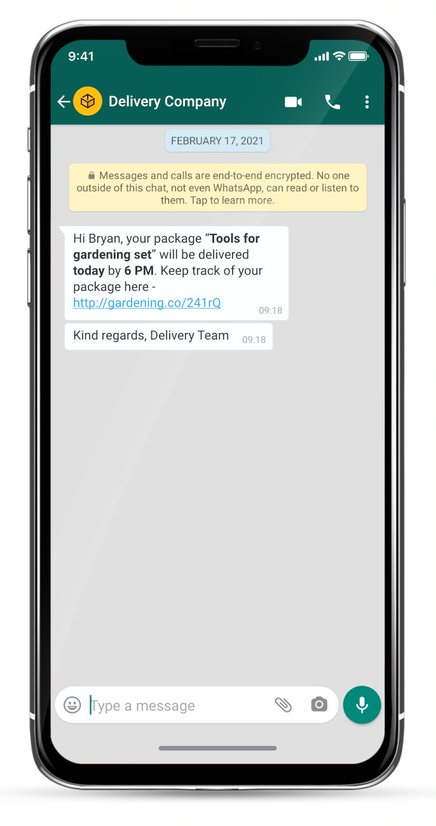
The difference is clarity, confidence, and professionalism.
🧩 How Business Owners & Trainers Can Use This Daily
🔹 Trainers & Coaches
-
Session announcements
-
Assignment instructions
-
Feedback & follow-ups
-
Community engagement messages
🔹 Business Owners & Entrepreneurs
-
Product launches
-
Promotional offers
-
Customer communication
-
Support updates
🔹 Sales & Marketing Teams
-
Pitch messages
-
Follow-up nudges
-
Closing conversations
-
Offer comparisons
⚠️ Common Mistakes to Avoid
-
Overusing bold everywhere
-
Writing long paragraphs
-
Using ALL CAPS
-
Mixing too many formats in one line
Remember: Formatting should enhance your message—not distract from it.
💡 Pro Tips for High-Impact WhatsApp Messages
✔ Use 1–2 formatting styles per message
✔ Keep messages short and scannable
✔ Add line breaks for easy reading
✔ Use emojis sparingly and meaningfully
📈 The Real Business Impact
Professionally formatted WhatsApp messages:
-
Increase response rates
-
Improve brand perception
-
Reduce confusion
-
Drive faster decisions
When used strategically, WhatsApp becomes your marketing tool, classroom, and sales assistant.
🧭 Final Thought
People don’t ignore messages—they ignore poorly presented messages.
Mastering WhatsApp formatting is a small skill with massive business impact.
Using Symbols for Impact, Clarity & Conversions

🎯 Module Objectives
By the end of this session, participants will be able to:
Format WhatsApp messages professionally
Highlight key information clearly
Increase message readability & response rate
Use WhatsApp effectively for marketing, training, follow-ups & engagement
⏱ Suggested Duration
60–90 Minutes (Hands-on Session)
👥 Target Audience
Business Owners & Entrepreneurs
Trainers, Coaches & Consultants
Sales & Marketing Professionals
HR & Learning Professionals
🧠 Why WhatsApp Formatting Matters
90%+ messages are read within minutes
Poor formatting = ignored messages
Smart formatting = attention, trust & action
✍️ CORE WHATSAPP FORMATTING SYMBOLS (Hands-on)
1️⃣ Bold Text
Syntax:
*Text*
Example:
*Limited Seats Available*
📌 Use for:
Headlines
Offers
Important announcements
2️⃣ Italic Text
Syntax:
_Text_
Example:
_Registration closes today_
📌 Use for:
Emphasis
Soft highlights
Notes
3️⃣ Strikethrough
Syntax:
~Text~
Example:
~₹5,000~ ₹2,999
📌 Use for:
Discounts
Old price vs new price
Corrections
4️⃣ Bold + Italic
Syntax:
*_Text_*
Example:
*_Early Bird Offer_*
📌 Use for:
High-priority highlights
Urgent actions
5️⃣ Monospace (Code Style)
Syntax:
```Text```
Example:
```Batch starts: 21 Dec```
📌 Use for:
Dates
Timings
Course codes
Instructions
6️⃣ > Block Quote (Reply / Emphasis Style)
Syntax:
> Text
Example:
> Only 20 seats available
📌 Use for:
Testimonials
Important reminders
Trainer instructions
📊 STRUCTURING BUSINESS MESSAGES (Before vs After)
❌ Poor Message
Hi we are conducting a training on whatsapp business and ai on sunday please join contact us
✅ Professional Message
*📢 Trainer’s Meet – Chennai*

*_Special Session on WhatsApp Business & AI_*

📅 Date: *21st December 2025*
⏰ Time: *9:00 AM – 12:00 PM*
📍 Venue: *Smatal Academy*

> Limited seats available

📞 Contact: 9XXXXXXXXX
🧩 BUSINESS USE CASES
🔹 For Trainers
Session announcements
Assignment instructions
Feedback & follow-ups
Community engagement
🔹 For Business Owners
Product launches
Offers & promotions
Customer support
Broadcast messages
🔹 For Sales Teams
Pitch clarity
Offer comparison
Follow-up nudges
Closing messages
🎯 ACTIVITY (Live Exercise – 15 Minutes)
Task 1: Message Makeover
Participants rewrite this using formatting:
“Tomorrow class at 7 pm join on time link will be shared”
Expected Output:
*📚 Class Reminder*

📅 Date: *Tomorrow*
⏰ Time: *7:00 PM*

> Join on time. Link will be shared.
⚠️ COMMON MISTAKES TO AVOID
Overusing bold everywhere
Using multiple fonts in one line
Writing long paragraphs
Using ALL CAPS (looks aggressive)
📌 PRO TIPS
✔ Use 1–2 formats per message
✔ Add line breaks for readability
✔ Use emojis sparingly but meaningfully
✔ Keep messages scan-friendly
📈 BUSINESS IMPACT
Higher open & response rates
Professional brand perception
Clear communication
Better conversions & engagement
📦 BONUS (Optional Advanced Tips)
WhatsApp Business quick replies
Labels & broadcast lists
Catalog & automated greetings
Using formatting with AI-generated content
🧭 Trainer Closing Script
“WhatsApp is not just a chat app.
Used smartly, it becomes your marketing tool, classroom, and sales assistant.”
If you want, I can also provide:
✔ PPT slide structure
✔ Practice worksheets
✔ Trainer script & demos
✔ WhatsApp-ready message templates
✔ Advanced module combining WhatsApp + AI prompts
Just tell me 👍

No comments:
Post a Comment